
How to Increase Ad CTR (Clickthrough Rate) for AdSense
Most publishers think they need more traffic to earn more. Wrong. What they really need is a stronger CTR. You can have 50,000 sessions a month and still make less than someone with half your traffic but a smarter clickflow.
The issue? Most pages aren’t built with CTR in mind. CTAs are weak, placements are random, and the user journey is left to chance. No wonder clicks are low.
This article breaks down the proven CTR optimizations that turn existing traffic into real revenue without redesigning your site or chasing unrealistic traffic goals.
What CTR Means for AdSense?
The CTR (Clickthrough Rate) is the ratio of the number of users clicking on your ads to the number of total users that have viewed your page, expressed in percentage. This KPI in AdSense has a direct impact on your revenue as AdSense follows the cost-per-click (CPC) model. A higher CTR implies more clicks for the same amount of traffic and hence, earnings are increased instantaneously without the need for more pageviews.
Additionally, a High CTR indicates that the users’ intentions match the ads’ placements. When advertisement spots are unobtrusive in the reading flow, or are in the vicinity of the visually most demanding sections, then the users are more likely to participate, thus increasing the value of your traffic. This, in turn, leads to an increase in RPM, and Google gradually gets better at serving ads that pay higher rates through improved quality.
Why Publishers Struggle With Low CTR (Common Causes)
Low CTR usually comes down to:
1. Ads placed where users never look
If your ads sit in blind spots—like far below the fold or squeezed in the sidebar—users simply don’t notice them. AdSense CTR drops because the ads never enter the natural reading path. Visibility matters more than volume.
2. Wrong ad formats for the page structure
Using the wrong ad size can make ads blend into the layout or appear awkward on mobile. For example, a horizontal ad inside a vertical content layout gets ignored. Matching ad size to page flow increases natural visibility and clicks.
3. Weak content intros causing early scrolls
If the intro doesn’t hook users, they scroll too fast and miss the first ad placements—often the highest earning spots. Weak openings reduce both time on page and ad exposure, directly lowering CTR.
4. Too many distractions above the fold
Menus, sliders, pop ups, banners, or unnecessary widgets push your main content and your first ad below the fold. When the above the fold area is cluttered, the first ad loses prime visibility and CTR drops.
5. Mobile layouts not optimized for thumb movement
Most traffic is mobile, and users scroll with their thumb. If ads aren’t aligned with natural scroll patterns, they get skipped instantly. Poor spacing or placement kills CTR even with good content.
How User Behavior Affects Ad CTR
Ad CTR is shaped by how people move through your page. Every action they take influences what they notice and what they ignore.
- Where users stop scrolling : If most visitors pause in the first 20–30% of the article, ads placed beyond that point barely get visibility. CTR rises only when ads appear in the sections where readers naturally slow down.
- Which sections they spend longest on : High dwell time areas — like tutorials, step by step guides, or list explanations — generate more ad exposure. Adding an in content ad inside these “attention zones” often produces higher CTR.
- Which paragraphs they re read : When readers scroll up to re-check a point, the ad near that paragraph receives extra impressions. Re-read sections are prime spots for mid-article ads.
- Which devices they use : On mobile, thumb stop zones (just after headers, at content breaks, or after the intro) capture the most clicks. Desktop users engage more with sidebar or mid-content placements.
High Impact Areas on a Page That Boost CTR
These are the areas where clicks consistently occur on informational blogs:
1. Below the introduction
Users pause before scanning the next section — perfect for a responsive ad.
2. In content ad between section breaks
Works well because readers slow down between headings.
3. Right after a list, table, or comparison block
These elements create cognitive “wrap up” moments where ads blend naturally.
4. Above the fold sidebar (desktop only)
Reliable for niches with strong commercial intent.
5. Near the conclusion
Users deciding what to do next often engage with relevant ads.
CTR increases when ads blend into natural reading pauses, not when they interrupt content.
Tips to Increase CTR for Google AdSense
Here are the most effective, techniques that consistently raise CTR safely and within AdSense policies:
1. Use Fewer Ads but Place Them Smarter
The biggest CTR mistake is assuming “more ads = more clicks.” In reality, every additional ad competes for user attention and reduces overall trust. Text laden layouts can often make users scroll through a site quickly and practically ignore every ad. Thus, the clean page with only a discreet two to three good placements at the bottom usually performs better than the messy layout.
Smart placement keeps the user comfortable while still exposing them to ads at natural reading pauses. Your goal is to make ads blend into moments where users are already paying attention — not force them into spaces where readers are trying to ignore distractions.
2. Add One Ad Under the First 100–150 Words

The first few lines of your article are prime real estate. Readers slow down here to evaluate whether the content is worth reading. This is the moment when attention is highest, making it the most reliable placement for a strong AdSense CTR.
Placing a responsive display ad right under the intro ensures the ad appears before scroll momentum builds. It captures users who engage with the content and those who only skim — giving you maximum visibility without feeling intrusive.
3. Insert Ads After H2 Subheadings
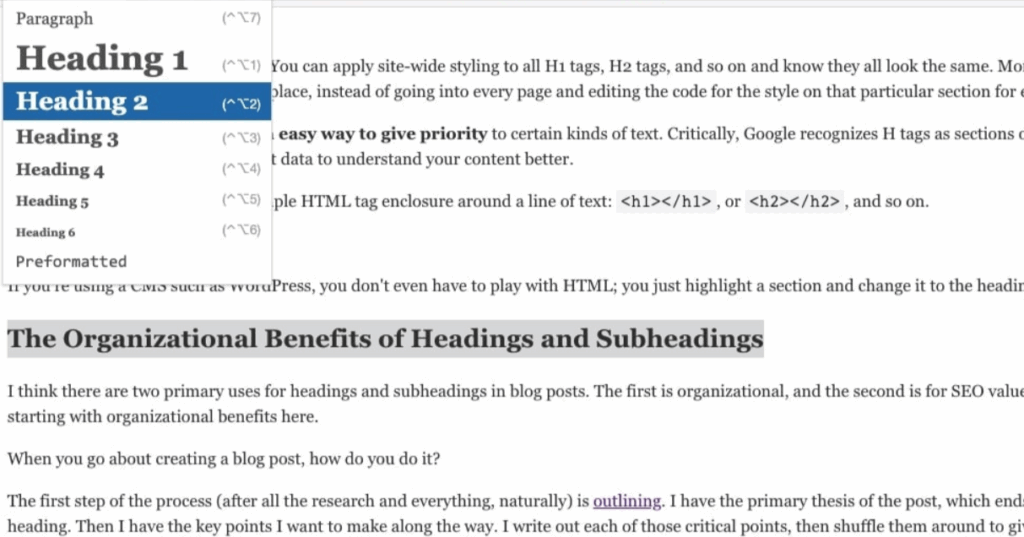
H2 breaks create natural reading pauses. Users stop scrolling for a second, refocus on the new section, and adjust their reading pace. This micro-pause is one of the most consistent ad engagement points across long-form content.
Putting an ad right after an H2 subheading delivers exposure at the exact moment users are looking up and re-orienting themselves. It doesn’t interrupt the flow, and it feels like part of the reading rhythm — which increases both visibility and click probability.
4. Remove Distracting Elements Above the Fold
Anything that pushes your first ad below visibility — carousels, oversized hero images, newsletter popups — destroys CTR. The top fold should be clean, fast, and content-first so the first ad appears naturally without being buried under heavy design elements.
Minimizing visual clutter helps users focus on the content immediately. And when the intro is quickly visible, the ad placed below it becomes visible earlier too, raising the chance that more people interact with it.
5. Use AMP (Only If You Can Maintain UX)
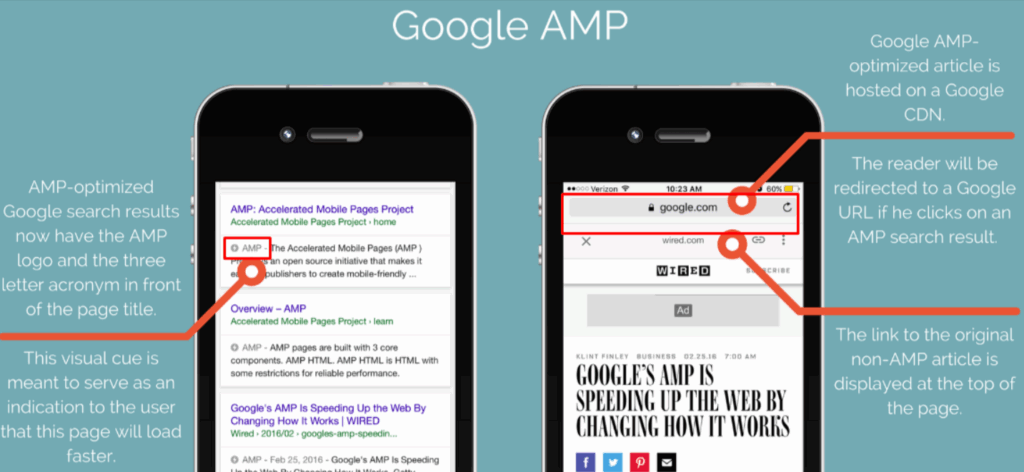
The simplified layout of AMP pushes any messy version of a page to a clean, mobile optimized format. Faster ad loading time and more predictable appearance of all ad units will result in a higher CTR while fighting off other distractions.
However, AMP only works if your UX stays consistent. If your AMP version feels stripped or broken, users may bounce faster. Implement AMP only when you can maintain visual quality and content formatting.
6. Improve Page Speed
AdSense ads depend heavily on page load performance. When pages load slowly, ads appear late — and sometimes too late for users who scroll before the unit loads. This reduces impressions and kills CTR.
By improving page speed, you ensure ads load at the correct moment during normal reading flow. Faster loading also increases user satisfaction, improves scroll depth, and reduces bounce — all of which help your ad units gain more visibility and clicks.
CTR Mistakes That Kill Ad Performance
Avoid these mistakes that reduce CTR drastically:
- Overloading Pages with Ads : Google may show fewer ads if your page is stuffed, reducing impressions and CTR.
- Placing Ads Too Low : Most readers never scroll to the bottom — low placements deliver almost zero clicks.
- Using Unrelated Titles and Content : If Google can’t detect topical relevance, it serves generic ads with low engagement.
- Writing Long, Unbroken Paragraphs : Readers bounce early, and ads never get the chance to load fully.
- Ignoring Mobile Optimization : Most clicks come from mobile. A poor mobile layout wipes out CTR.
High Converting Ad Formats for Higher CTR
Not all AdSense formats perform the same. Some naturally blend with user behavior and page structure, making them far more likely to get clicked. Using the right formats in the right places is one of the fastest ways to increase CTR without adding more ads.
Below are the formats proven to generate higher engagement and cleaner monetization, especially on content heavy websites :
1. In Article Ads
In article ads fit directly inside your content, appearing where readers are already focused. Because they match the natural reading flow, users see them as part of the experience rather than an interruption. They work especially well on blogs targeting problem solving or how to queries, where engagement time is higher. Placing them after an H2 or between meaningful sections increases visibility without hurting UX.
2. Anchor Ads
Anchor ads stay pinned to the bottom of the screen, giving them constant visibility — especially on mobile. Since mobile users scroll quickly and rarely stop at mid-content placements, a persistent ad performs better than static slots. These ads don’t disrupt reading, and users often click them because they remain noticeable throughout the session. They deliver some of the highest CTRs for websites with more mobile traffic than desktop.
3. Multiplex Ads
Multiplex ads mimic a grid of related posts, using a layout similar to recommended content widgets. This design makes the ads feel native and highly clickable, particularly for audiences who browse multiple pages per session. They work well on lifestyle, DIY, and tutorial blogs where users naturally explore several articles. The visually rich layout increases curiosity-based clicking without forcing attention.
4. Auto Ads (With Proper Controls)
Auto Ads can improve CTR by placing ads in high performing zones that manual testing may miss. Google uses behavioral signals to predict which locations attract clicks, then adjusts placement dynamically. However, using Auto Ads without blocking controls can overcrowd pages, hurting engagement. The best approach is to enable Auto Ads but restrict intrusive formats and limit the number of placements — allowing Google’s algorithm to optimize based on user behavior while keeping UX clean.
Use Only 2–3 Formats Together
Combining too many formats lowers trust and increases ad blindness. The best-performing setups typically include:
- In Article + Anchor
- Multiplex + In Article
- Anchor + Auto Ads (restricted)
A focused, minimal setup leads to better visibility, more clicks, and a smoother experience.
How Different Niches Produce Different CTR
CTR isn’t the same for every website because users behave differently depending on the intent of the topic. Some niches naturally attract more ad interaction because visitors arrive with a clear problem they want solved.
High CTR niches (jobs, finance, real estate, tutorials, DIY)
Those categories draw people who are looking for answers or possibilities. Because their purpose is clear, they focus more on adverts that correspond to their current requirements — which results in a higher CTR.
Moderate CTR niches (travel, lifestyle, food)
Users here browse for ideas or inspiration rather than urgent solutions. They scroll more casually, so ads still get seen, but clicks are not as frequent.
Low CTR niches (tech news, meme sites, entertainment blogs)
Visitors consume content quickly and rarely pause. They are there for updates or fun, not problem-solving. This low intent behavior results in fewer ad interactions and overall lower CTR.
Conclusion
Increasing CTR is not about adding more ads — it’s about placing them where users genuinely look. Focus on layout, reading flow, user behavior, page speed, device optimization, and content quality. When ads align naturally with user attention, CTR rises without violating policies or compromising user experience.
Optimize strategically and consistently, and your existing traffic alone can produce far higher AdSense earnings.
FAQs
How to increase CTR in AdSense?
AdSense CTR can be increased if you have fewer ads in the more visible areas like under the first 150 words and after H2s. To make it easy for readers to scan content, change content structure, eliminate distractions above the fold, and use high performing formats like in article and anchor ads.
What is a good CTR for AdSense?
A “good” CTR varies by niche, but most publishers see strong results anywhere between 1% to 3%. High-intent niches like finance, jobs, and tutorials may go above this, while entertainment and news blogs typically stay lower. The key is improving relevance and user behavior, not chasing universal numbers.
Is a 3% CTR good?
Yes, 3% CTR is considered very good for most AdSense sites. It usually signals strong ad placement, quality content, and high-intent visitors. Only a few niches go much higher, so hitting 3% consistently means your layout and user experience are working.
Is $20 a day good for Google Ads?
Earning $20/day is decent for small blogs or new publishers, especially if traffic isn’t huge. It means your CTR and CPC are healthy. But for established sites with thousands of daily visitors, $20/day may indicate poor placements or weak audience targeting.
Is 20k impressions good?
Yes, 20,000 impressions is a solid start, but impressions alone don’t guarantee earnings. What matters is how many of those impressions turn into meaningful clicks. With optimized placements, even 20k impressions can generate strong revenue — but with weak CTR, they bring very little value.