
How to Fix Cumulative Layout Shift (CLS) for Better UX & SEO
Cumulative Layout Shift (CLS) quantifies the visual stability of your website during its loading process. It shows the times when the content ungracefully jumps — akin to a button suddenly moving just before the click of a user. Layout shifts like these destroy user confidence, irritate users, and diminish site-wide experience.
Cumulative Layout Shift as one of the Core Web Vitals at Google means that a low score would also lower your search on the results page. Solutions to CLS will lead to improved user experience as well as SEO performance. In this guide, we elaborate on what CLS is, how to measure it, and the best ways to fix it.
What Is Cumulative Layout Shift (CLS)?
CLS is a Core Web Vital metric that quantifies unexpected layout movement during page load. It is calculated using this formula:
CLS = impact fraction × distance fraction
- Impact fraction: How much of the screen was affected by movement.
- Distance fraction: How far elements moved relative to the viewport.
Google’s scoring thresholds are:
| Score | Category | Description |
|---|---|---|
| 0.1 or less | Good | Stable layout |
| 0.1 – 0.25 | Needs improvement | Minor shifts |
| Above 0.25 | Poor | Noticeable, frustrating shifts |
How to Measure and Diagnose CLS Issues
Identifying CLS problems starts with accurate measurement using the right tools. These methods help you pinpoint unstable elements and track layout shifts effectively.
- Google PageSpeed Insights: Instantly verify your CLS score and receive comprehensive improvement recommendations. It reflects the performance of your pages for real users by utilizing actual Chrome User Experience (CrUX) data.
- Lighthouse (in Chrome DevTools) : Run a performance audit directly in your browser. Lighthouse highlights layout shifts, shows affected elements, and assigns a CLS score per page.
- Google Search Console → Core Web Vitals Report : Review aggregate CLS data for your entire site. It flags pages with “Poor” or “Needs Improvement” CLS, so you can prioritize fixes efficiently.
Why Fixing CLS Is Important for UX and SEO
User Experience (UX) Stability
Users get very annoyed when there are unexpected layout shifts, and they also find it hard to use the website. Users are quick to lose trust when buttons or text suddenly move. A low CLS keeps the page fully stable, making it easier to read, click and browse without distractions.
SEO and Search Rankings
One of the important factors Google uses to evaluate websites is the CLS of the Core Web Vitals. Even a website with quick loading and fast interactivity could still lose its ranking due to poor layout stability.
Conversion and Engagement Rates
Movements or jumps in the content lead to users being unsure to perform the actions like signing or buying that require payment information to be filled. A stable layout provides a smoother experience, hence, building a user’s trust and increasing both engagement and conversions.
Brand Perception and Trust
A website that is visually stable appears to be more professional. When the different parts stay where users expect them to be, it signals reliability — this is one of the small but very important factors that increase brand trust and credibility.
Mobile Experience Optimization
Mobile users experience more layout shifts due to the smaller size of the screen and the slower connection. Fixing CLS enables your mobile pages to load in a predictable manner, thereby enhancing retention and cutting down bounce rates.
Common Causes of High CLS Scores
A substantial Cumulative Layout Shift (CLS) score often indicates problems with the page structure or loading that interrupt the rendering of the webpage. The following are the major contributors to this problem and the reason they cause instability during the process of page loading.
1. Unoptimized Images
Inserting images without their dimensions (width and height) defined, causes the browser to not know how much space to reserve for them until they load. The consequence is that when the image finally shows up, the surrounding text or elements move.
Example: A blog thumbnail loads slowly, and when it appears, it pushes the headline and buttons downward — causing a visible layout jump.
2. Ads or Embeds Without Reserved Space
Third party ads, iframes, and embedded videos are frequent CLS offenders because they often load asynchronously. When these elements finally render, they can displace already-loaded text or content.
Example: An ad loads halfway through the page and pushes product details or CTAs down, breaking reading flow and frustrating users.
3. Dynamic or Lazy-Loaded Elements
Many of the modern web pages are loaded with extra content that comes in dynamically (e.g., comments, articles similar or infinite scrolls). Reserved space for these elements is not there and, thus, page layout is reflowed when they become visible.
Example: A lazy loaded image or “related post” widget pops in suddenly while the user is reading, shifting visible content out of view.
4. Web Fonts (FOIT & FOUT)
Custom web fonts can cause layout shifts when text switches from a fallback font to the custom typeface after it loads.
- FOIT (Flash of Invisible Text): Text remains invisible until the font loads.
- FOUT (Flash of Unstyled Text): Text first appears in a fallback font, then changes when the custom font loads — causing spacing changes.
Example: A paragraph initially appears in Arial, then shifts position slightly when replaced with a wider custom font.
5. JavaScript DOM Manipulation

When the scripts modify the Document Object Model (DOM) after the initial page rendering, that can lead to unexpected movement or resizing of elements. Classic cases include sticky banners, pop-ups, or widgets that are dynamically added.
Example: A promotional banner gets displayed at the very top of the webpage after a few seconds and, as a result, the entire content moves down.
6. Animations or Transitions
Animations can degrade visual stability when they manipulate layout changing properties like height, margin, or padding. Each frame of the animation triggers a layout recalculation, creating small but measurable shifts.
Example: An expanding banner or dropdown changes height dynamically, pushing other elements on the page downward.
How to Measure and Diagnose CLS Issues
You can’t fix CLS without accurate measurement. Google provides multiple tools to detect shifts and find their causes.
Field Tools (Real World Data)
These collect actual user data (RUM – Real User Monitoring):
- Google Search Console (Core Web Vitals report): Lists poorly performing CLS pages.
- Chrome User Experience Report (CrUX): Collects user data from real user browsing sessions.
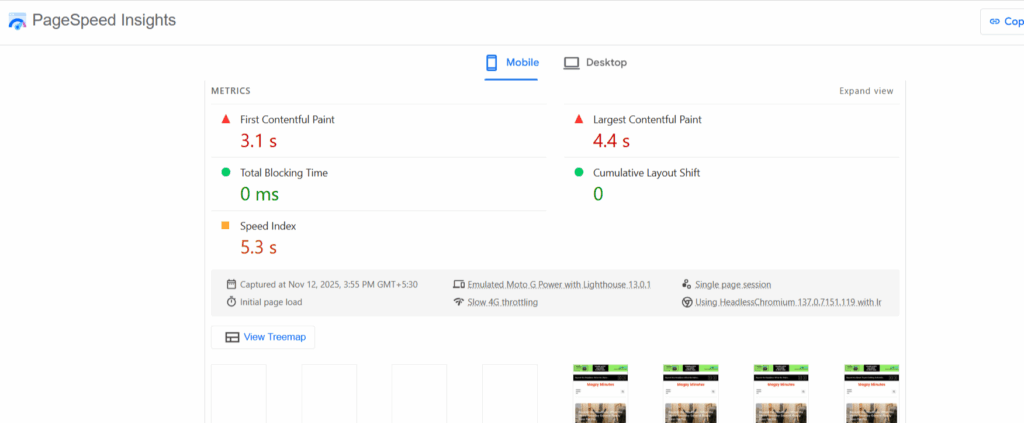
- PageSpeed Insights: merges lab and field data, detecting layout shifts and giving tips for improvement.
Lab Tools (Controlled Testing)
Use these before publishing updates:
- Lighthouse (Chrome DevTools): Measures CLS locally and identifies shifting elements.
- WebPageTest.org: Provides a filmstrip view to visualize when and where shifts occur.
- Chrome Performance Panel: Displays “Layout Shift” markers in the timeline for detailed debugging.
By combining field and lab insights, you can pinpoint exact elements causing instability.
How to Fix Cumulative Layout Shift (CLS)
1. Fix Image Related Shifts
Apart from that, the most pronounced factor of layout instability is images. When gallium dimensions are undefined the browser is not able to predict the amount of space to be reserved thus causing visible jumps throughout the loading process.
- The first step is to always specify explicit width and height attributes so that the browser could reserve adequate space before rendering.
- Another option is the CSS aspect ratio property that can help keep proportional scaling across devices.
- Responding to the needs of different screen types is done through the implementation of responsive images with srcset and size attributes.
- Preload critical, above the fold images for faster rendering and smoother visual loading.
2. Reserve Space for Ads, Embeds, and iFrames
Third-party ads and embeds often load late, pushing down content and causing severe CLS issues. Prevent this by reserving fixed spaces for them.
- Assign fixed-size containers for ads, video players, or widgets before scripts load.
- Use placeholder boxes or fallback banners to hold space until ads render.
- Never inject ads dynamically above existing content — define and keep consistent ad zones.
- For responsive layouts, use CSS min-height or aspect ratios to retain reserved space.
3. Handle Fonts Efficiently
Fonts can cause sudden shifts when they load slowly or render differently from fallback fonts. Proper handling ensures visible, stable text.
- Apply
font-display: swaporoptionalin CSS to display fallback text immediately, preventing invisible text flashes (FOIT). - Preload essential fonts using
<link rel="preload">so they become available faster. - Prefer system fonts for core UI components like menus or buttons to avoid late re-rendering.
- Ensure line heights and spacing remain consistent between fallback and web fonts.
4. Manage Dynamic and Lazy Loaded Content
Dynamic or lazy loaded elements like images, comments, or widgets can shift the page after initial render. Planning their space prevents this.
- Reserve fixed container heights for lazy loaded images or elements so they don’t move content when they appear.
- Prioritize above the fold content for immediate loading, deferring only lower sections.
- Avoid adding new elements above existing ones once the page is visible.
- Use Intersection Observer API to control how and when lazy loaded elements render.
5. Optimize JavaScript and Animations
Poorly timed JavaScript actions or heavy animations can cause visible layout jumps. Efficient scripting keeps rendering stable.
- Batch DOM updates together instead of making multiple layout changes individually.
- Use
requestAnimationFrame()for smooth, predictable transitions and DOM changes. - Avoid layout-triggering CSS properties like
height,margin, orpaddingduring animations — usetransformandopacityinstead. - Keep transitions subtle and contained within their parent element to reduce reflow impact.
Conclusion
Cumulative Layout Shift is not just a performance metric — it’s a measure of trust and usability. Users want stable pages during loading.
You will not only enhance UX but also solidify your SEO base by removing the typical offenders of unoptimized images, delayed fonts, or late-loading ads.
The CLS should be optimized with every web maintenance cycle. A site with visual stability decreases frictions, improves engagement, and shows quality — the same aspect users and search engines reward.
FAQs
What is a good CLS score?
A CLS score of 0.1 or lower indicates an excellent scenario and visual stability of the page. Between 0.1 and 0.25 are scores that call for improvements, whereas any score higher than 0.25 means serious layout instability that can negatively affect the user experience.
Does CLS affect SEO rankings?
Definitely. Among the Google Core Web Vitals is the CLS, which can influence search ranks directly. A low CLS score denotes a bad user experience, which is why your site will rank lower regardless of strong performance in other areas.
How often should I test CLS?
You should test CLS regularly, especially after making design, layout, or ad placement changes. Frequent monitoring helps you catch new shifts early and maintain consistent performance across updates.
Can I fix CLS without coding?
Some improvements, like defining image dimensions or reserving ad slots, can be done through basic settings or CMS plugins. However, advanced fixes involving scripts or CSS layout optimization usually require a developer’s input.
Does lazy loading cause layout shifts?
Yes, if lazy loaded elements don’t have reserved space. Always define a fixed height or aspect ratio for images and videos so the browser knows how much space to keep before they load.
How do I find elements causing layout shifts?
Use tools like Chrome DevTools or Lighthouse to record page performance. They highlight specific elements and events responsible for layout movements, helping you identify what needs adjustment.
Do animations affect CLS?
Yes. Animations that modify layout related CSS properties like height or margin can trigger shifts. Use transform and opacity properties instead — they animate smoothly without changing layout flow.