
How to Craft SEO Friendly URLs for Improved Search Visibility
Making a SEO friendly URL involves having a link that is precise, easy for readers and search engines to comprehend. The combination of the keyword(s) in the URL title or description at least in a unique manner makes it easier for the user to figure out where your link is directed.
So, what does the SEO friendly structuring of URLs look like? Well, let’s begin, and you will learn the must know and beneficial guidelines and work put toward constructing clean, legible, and search engine friendly URLs that ultimately enhance visibility, utility, and overall search performance. Let us get started now.
Why URL Structure Matters?
URLs play a vital role in informing search engines as well as users about a webpage. Good URL structures, in terms of indexing, usability, and sharing, thus offer better searchability.
Benefits of SEO Friendly URLS:
- Better search engine understanding: A legible URL fills context around those pages and thereby assists search engines to accurately index them and make them relevant for searches.
- Better user experience: Readable URLs ultimately help humans to understand what the page is about, greatly reducing the chances of user confusion, which in turn increases the user trustfulness and hastens acquaintance with the site.
- Higher CTRs: URLs in the search results are visible. The professional feel and significance given by the URL contribute to the likelihood of them being clicked on by users.
- Ease of Sharing and Remembrance: In case the URL is short and descriptive, it can be quickly shared through copy-paste tactics on social media or an email. And the URL becomes easy to remember for a later visit.
Understanding the Parts of an URL
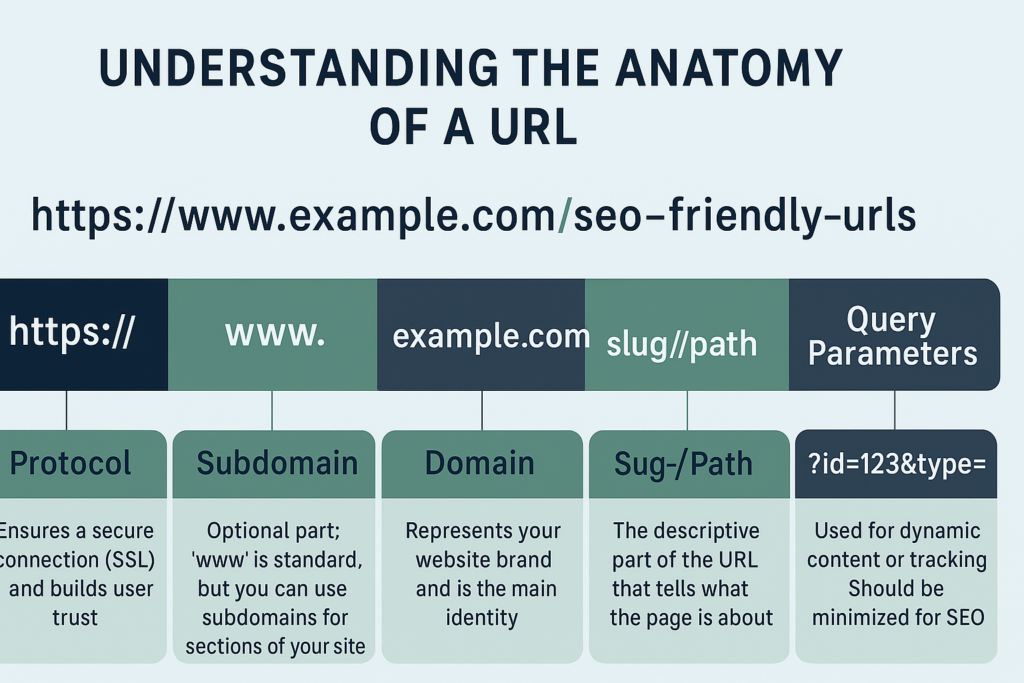
There are several components associated with the URL, and each part contributes to SEO and user experience. Knowing these components helps you structure the URLs right.
| Component | Example | Purpose |
|---|---|---|
| Protocol | https:// | Ensures a secure connection (SSL) and builds user trust. |
| Subdomain | www. or blog. | Optional part; www is standard, but you can use subdomains for sections of your site. |
| Domain Name | example.com | Represents your website brand and is the main identity. |
| Slug/Path | /seo-friendly-urls | The descriptive part of the URL that tells what the page is about. This is the part you should optimize for keywords. |
| Query Parameters | ?id=123&type=blog | Used for dynamic content or tracking. Should be minimized for SEO. |
| Anchor | #section1 | Points to a specific part of a page. |
The Key Rules of SEO Friendly URLs
Here are the main steps to building SEO-friendly URLs:
- Appealing: A URL must make good sense without the need for subsequent clicks.
- Simple and short: Refrain from using too much of unnecessary words, numbers or codes.
- Keyword relevance: Include the main topic keyword naturally.
- Logical structure: Mirror a website hierarchy, entailing categories > subcategories > page.
- Lowercase letters: Prevent duplicate content issues and confusion on some servers.
As an example:
Bad URL: /blog/post?id=987
SEO friendly URL: /blog/seo-friendly-url-guide
Step by Step Method to Build SEO Friendly URLs
Easily strengthen user-friendly experience by providing well-structured URL’s for navigation and sharing of his pages. Here, therefore, is the step by step guide to creating effective & SEO URL’s:
1. Look For Primary Keywords
The first step in creating URLs for proper SEO is, of course, to find a main, defining keyowrds. These defining words can either be single or plural and should be a direct description of the reason for the page. The main keyword has to be relevant to the content and get the functionality of page through to the user and search engine and work on both ends.
In choosing the main keyword, the following are factors to keep in mind:
- Relevance: The more related the main keyword is to the content, the better. As an example, consider the main keyword ’SEO URL’ or ’SEO friendly URL’ if the content teaches ways of creating SEO friendly URLs.
- Simplicity: Use a keyword that is straightforward and to the point. Avoid long key phrases that are awkward as they can confuse an individual or make the URL cumbersome to interact with.
- Avoid stuffing it with too many keyword phrases: Never overload the URL with multiple irrelevant keyword phrases. Overloading a URL with a cluster of various keywords only makes it look spammy and reduces readability.
Here is a good example:
An acceptable example: /seo-url-guide: The keywords are sharply focused on existing page content, are brief, and cute enough for the user.
Wrong example: /seo-url-guide-best-tips-website
2. Keep URLs Short and Relevant
Short URLs do justice to one’s reading capability for better memory relay and the ease of sharing. Keep off unnecessary words, numbers, and additional details unless absolutely necessary. Instead, center on making sure that whatever words selected are right ones to exhibit what the content is really about.
- Wrong example: /blog/best-practices-for-making-seo-friendly-urls-2025
- Good Example:
/blog/seo-friendly-url-tips
3. Hyphenate Separated Words
Use hyphens (-) in between words; search engines see them as separators, which is not the case with underscores (_) or spaces.
- Correct: /seo-friendly-url-tips
- Improper: /seo_friendly_url_tips
4. Use the Same Case
Make sure of only lowercase letters for URLs. The next best thing is a few uppercase issues or broken links provided the server.
- Example: /seo-tips/seo-friendly-urls
- Avoid: /SEO-Tips/SEO-Friendly-URLs
5. Reflect the Site Structure
If necessary, supplement the URL with categories or subcategories to make it convenient. The logical structuring would allow navigation on your website for the users and search engine.
Example: /blog/seo-tips/seo-friendly-urls
6. Use 301 Redirects for Changes
301 Redirect should be implemented if you are updating an existing URL. This would guide visitors and search engines alike to the up to date page.
Example: Old URL: /seo-tips/old-url Redirect to: /blog/seo-tips/seo-friendly-urls
Tools for URL Optimization
- Google Search Console: This allows you to identify the URL indexed and any errors.
- Screaming Frog/Ahrefs: Use this tool to audit the URL structure of the whole site.
- WordPress Plugins(Yoast SEO, RankMath): These SEO plugins suggest URL structures that are optimized for content creation.
Hence, whenever such problems are discovered, you will have guides to maintain terrific and SEO-friendly URLs.
Examples of Effective vs Ineffective URLs
| Page Type | Ineffective URL | Optimized URL |
|---|---|---|
| Blog Post | /post?id=456 | /blog/seo-friendly-url-tips |
| Product Page | /product/AB123 | /products/blue-running-shoes |
| Category Page | /cat?type=clothes | /categories/mens-clothing |
| Landing Page | /lp?id=promo2025 | /summer-sale-2025 |
FAQs
1. How does the URL structure affect SEO?
URLs are helping search engines to recognize page content. A clean URL, relevant to keywords, may assist in the indexing and ranking process.
2. Can longer URLs rank well?
Yes, but short URLs are better for users and are easily assessed by search engines, which means generally better CTR.
3. I have to change old URLs for SEO purposes?
Change them only if you can improve upon clarity or keyword relevance. Provide 301 redirect option to preserve SEO values.
4. Should keywords be included in the URL?
Yes, one should add the first, keyword-rich part in the URL – this will help the search engines to understand the page context but do not cross the keyword density limit.
5. Static vs dynamic URLs: which is better?
Static URLs are appreciated by search engines for serious SEO endeavors as they are clean, readable, and shareable. Dynamic URLs are okay for certain cases, but the prescribed should be well-understood – that is, they will have canonical tags set in place.
Conclusion
Creating SEO friendly URLs is just a small, yet most important part of optimizing the site. A nice and short URL with the keyword keeps the search engine indexing on right feet; it also gives a smooth experience to users and thus (“therefore!”) pushes up click through rates.
Following the necessary essentials pertaining to the URLs that matter and evading a handful of mistakes will see help to ensure that the URLs create quite the advantage by increasing visibility and performance in the search results.