
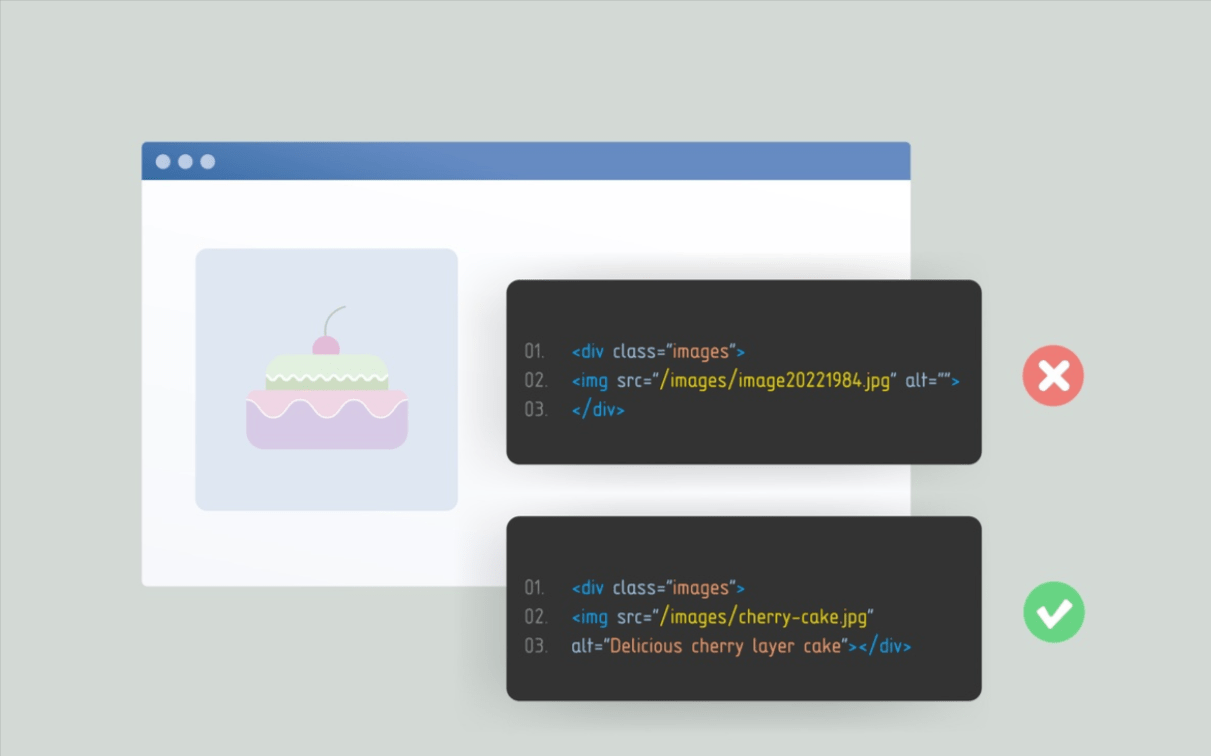
What is Alt Text and How to Use It for Better SEO?
Images can contribute to the written content and appear attractive on the web. But images are not comprehensible to every visitor. To the visually challenged or people with slow connections, an alternative text does the job of explaining what an image is all about.
Search engines are also aided by alt text to get to know the image content and the context of the page. It is a way of making the website more accessible and at the same time supporting its SEO. We will discuss in the next paragraphs what alt text is and how to use it efficiently to make your website rank higher in searches.
What Alt Text Is and Why It Matters for SEO
Alt text (alternative text) is a short description that is inserted into an image through the alt attribute in HTML. The primary aim of it is to describe the image’s content when the image is not allowed to be shown or the page is being read by a screen reader.
For SEO, alt text helps search engines understand what an image represents. Search engines cannot fully “see” images like humans. They rely on signals such as:
- Alt text
- File name
- Surrounding text
- Page topic
What happens when alt text is missing or poorly written during search time? The image is no longer understood by search engines, which dilute the relevance of the page, mainly where images give essential information.
How Search Engines Use Alt Text
Search engines use alt text mainly for understanding and indexing images.
When Google crawls a page, it reads the alt text to:
- Identify what the image shows
- Understand how the image relates to the page topic
- Decide whether the image should appear in image search results
The alt text is also useful for Google to confirm the main topic of the given page. But this understanding will only take over the content if the images do not fight with this argument by clear alt text.
If alt text is vague, misleading, or stuffed with keywords, Google may ignore it. In some cases, poor alt text can even create confusion about the page topic.
How Alt Text Supports Page Level SEO
Alt text works as a supporting signal, not a main ranking factor. Its value comes from improving clarity.
Here is how it helps at page level:
- Confirms the topic of the page
- Adds context to visual content
- Helps search engines understand non text information
- Supports primary keywords naturally when relevant
Consider a blog post or article that observes a particular process by providing screen progressions. Now, average alt text explains what each screenshot shows. The added advantage is that the page can be made available for understanding by search engines as well as by users.
Alt text is especially important on pages where images are not decorative but informative.
How to Write SEO Friendly Alt Text
Apply alt text only to images that add value or meaning
Alt text should be utilized only where images would only help in explaining content or providing useful details, such as graphs, screenshots, product images, and training images. Slides just for design and decoration do not need alt text and leaving them empty will clear them from screen reader distraction due to redundancy.
Describe the image clearly and accurately, including relevant context
In whatever way the plain and simple purpose of the image explains the image should be described in the alt text. Think of the primary function of the image, which is supposed to enhance the content the image is associated with, and try not to provide any other descriptive information, unless such is necessary for understanding the image’s meaning.
Keep alt text concise, ideally under 125 characters
Just make sure alt text is short enough to be clear and easy to read. Long descriptions are usually just fluff that may hinder screen reader readability. Usually, one sentence is enough to responsibly describe an image.
Naturally incorporate your target keyword where appropriate
Keywords can only be appropriately and naturally included in alt text if they accurately describe the image. Keyword padding in alt text does not actually help SEO and can reduce the user friendliness of the text. If a keyword does not truly respect what the image truly is, it should be left out.
Be direct and descriptive—avoid phrases like “image of” or “picture of”
Placing the alternative text also promptly describes the image. Screen readers know to communicate to users that they are seeing images. The tag may, however, be omitted in phrases like “picture of” or “image of.”
3 Alt Text Examples (With Context)
1. Add Details Only When They Matter

Image context:
A sports image showing a football player holding a trophy on a stadium field.
Basic alt text:
“Football player holding a trophy”
This alt text is clear but lacks useful details. It tells users what is happening but not who or where.
Improved alt text:
“Lionel Messi holding the World Cup trophy at Lusail Stadium”
This version offers the best few details around the image as it matters to human and search engine queries. The identity of the player and event relevantly describes the image and makes it more searchable by player name or tournament-related keywords.
2. Use Keywords Naturally, Not Excessively

Image context:
A photo of a golden retriever lying on grass.
Poor alt text:
“golden retriever dog puppy pet dog breed friendly dog”
This alt text is stuffed with keywords and does not describe the image naturally. Screen readers and search engines often ignore this type of text.
Improved alt text:
“Golden retriever lying on green grass in a park”
This version clearly describes the image using natural language. The keyword appears once and fits the image, which keeps the alt text useful and readable.
3. Match the Alt Text With Page Context

Image context:
A step-by-step cooking page showing chopped vegetables on a cutting board.
Generic alt text:
“Chopped vegetables on a cutting board”
While accurate, this alt text does not match the purpose of the page.
Improved alt text:
“Chopped onions, tomatoes, and peppers prepared for vegetable stir fry”
Because the page explains a cooking process, the improved alt text reflects that context. This helps users understand why the image is shown and how it fits into the instructions.
Alt Text Best Practices by Image Type
Different images need different types of alt text.
1. Blog and Content Images
For blog images, alt text should:
- Describe the image
- Match the topic of the section
- Avoid repeating the same text for every image
Example:
“Internal linking structure diagram for SEO”
2. Product and Ecommerce Images
Product images need specific descriptions:
- Product name
- Key feature visible in the image
- Color or type if relevant
Example:
“Black leather office chair with adjustable armrests”
Avoid promotional language like “best” or “cheap”.
3. Screenshots, Charts, and Informational Images
These images carry information and must have meaningful alt text.
Example:
“Keyword research table showing search volume and competition”
For charts, describe what the chart shows, not its colors or layout.
4. Decorative Images
If an image is only for design and adds no information, use empty alt text:
alt=""
This tells screen readers and search engines to ignore it.
Alt Text and Image Search Optimization
Alt text helps images appear in Google Image Search, but it is not the only factor.
For better image search visibility:
- Use descriptive file names
- Place images near relevant text
- Write accurate alt text
- Match image content with search intent
What the user might expect to see as the alt text should match this. If the image answers a specific question or explains a particular process, describe that in the alt text as clearly as possible.
FAQs
Does alt text improve SEO rankings?
Alt text does not directly increase rankings, but it supports relevance and image visibility, which helps SEO overall.
How long should alt text be?
Usually between 5 to 15 words. Long descriptions are not needed unless the image is complex.
Should every image have alt text?
No. Informational images should have alt text. Decorative images should have empty alt text.
Can alt text include keywords?
Yes, but only when they fit naturally and describe the image correctly.
Can alt text be the same as the image caption?
It could be similar, but it should not be copied words for words, unless it describes the image perfectly. An alt text denotes an understanding of the image, while captions represent a more visible clarification.
Conclusion
In all truth, alt text does play a very minor role in SEO applications and accessibility, but it is essential. These short descriptions provide crawlable references to images, so they are a must for SEO. Some people who benefit from screen readers or have images disabled will also benefit from clear alt text. Moreover, the optimal practice is to keep alt text relevant, brief, and naturally informative—talking only about the image, not just feeding keywords.